Best obd2 Scanners with ECU Coding: 6 Spec-Based Picks
Compare 6 OBD2 scanners with ECU coding based on published specs. Choose between handheld tablets and Bluetooth adapters for your specific needs.
Prices and specifications come from the Amazon listing. Scores are out of 10, based on listed specifications and buyer feedback — this site does not test products.
As Amazon Associates, we earn from qualifying purchases. This means we may receive a small commission at no extra cost to you if you click through and make a purchase.
As an Amazon Associate we earn from qualifying purchases. Links on this page are affiliate links.
Finding the best obd2 scanners with ECU Coding requires matching specific diagnostic capabilities to your workflow. This guide compares 6 tools based strictly on the specifications published on their listings. The TOPDON ONE 10.1" Bidirectional Scan Tool leads because its 10.1-inch screen supports complex J2534 pass-thru coding for professional shops. Each device offers distinct connectivity and system coverage options. You will use this list to decide which hardware fits your vehicle’s protocol support and display needs. The picks focus on bi-directional control and all-system diagnostics rather than subjective opinions.
Choose your control method first
ECU coding tools split into handheld tablets or Bluetooth adapters. Handhelds like the TOPDON ONE 10.1" or MUCAR 892BT offer built-in screens for direct operation. Adapters like the Thinkcar Thinkdiag2 require your phone. Pick the form that matches your workflow. Handhelds suit stationary shop work. Bluetooth units fit mobile diagnostics.
| # | Product | Best for | Price |
|---|---|---|---|
| 1 | TOPDON ONE 10.1" Bidirectional Scan Tool Best overall | professional shops needing J2534 coding | |
| 2 | Thinkcar Thinkdiag2 Bluetooth Scanner Best budget | DIYers needing CAN-FD and bidirectional testing | |
| 3 | MUCAR 892BT 8-Inch AI OBD2 Scanner Best premium | Advanced ECU coding and large screen diagnostics | |
| 4 | XTOOL D7S All-System Bidirectional Scanner Also great | Technicians needing ECU coding and a large screen | |
| 5 | Dollarfix PF8 8-inch OBD2 Scanner Also great | ECU coding and active bidirectional tests | |
| 6 | ANCEL V5BT-US Black OBD2 Scanner Best black | home mechanics needing wireless bidirectional diagnostics |
The best fit for you
- You need professional J2534 pass-thru coding capabilities – TOPDON ONE 10.1" Bidirectional Scan Tool – The TOPDON ONE includes J2534 pass-thru coding and a 10.1-inch screen for complex diagnostics.
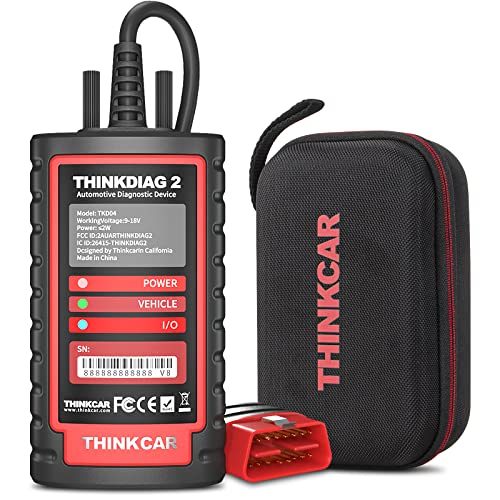
- You want the most compact scanner for phone use – Thinkcar Thinkdiag2 Bluetooth Scanner – The Thinkcar Thinkdiag2 is small and connects via Bluetooth to Android or iOS devices.
- You require advanced coding with FCA AutoAuth access – MUCAR 892BT 8-Inch AI OBD2 Scanner – The MUCAR 892BT supports FCA AutoAuth and DoIP protocols on an 8-inch display.
- You need wireless convenience for home mechanics – ANCEL V5BT-US Black OBD2 Scanner – The ANCEL V5BT-US offers Bluetooth and Wi-Fi connectivity for wireless bidirectional testing.

TOPDON ONE 10.1" Bidirectional Scan Tool
Best for: professional shops needing J2534 coding
- Diagnostic Functions
- Bi-Directional, ECU Coding
- System Coverage
- All-system
- Reset Functions
- 50+
- Protocol Support
- J2534, CAN-FD, DoIP
- Connectivity
- Dual Wi-Fi
- Screen Size
- 10.1"
The TOPDON ONE is a 10.1-inch bidirectional scan tool with J2534 pass-thru support. It features dual Wi-Fi connectivity and advanced ECU coding for major brands. The device includes topology mapping and over 50 service functions. Its large screen and fast wireless link suit professional mechanics needing dealer-level capabilities for module replacement and customization.
- 10.1-inch touchscreen for clear diagnostics
- J2534 pass-thru for OEM coding
- Dual Wi-Fi for stable connection
- Topology mapping for network visualization
- Supports CAN-FD and DoIP protocols
- Heavier at 3.47 pounds
- Standard one-year software update included
- Larger 12.2-inch length
- You need dealer-level ECU coding via J2534
- You prefer a large 10.1-inch display
- You work on newer vehicles with DoIP
- You require a portable handheld device
- You need lifetime free software updates
- You prefer Bluetooth-only connectivity
Verdict: The TOPDON ONE 10.1" OBD2 Scanner fits shops requiring J2534 pass-thru coding and a large interface for complex diagnostics.
Thinkcar Thinkdiag2 Bluetooth Scanner
Best for: DIYers needing CAN-FD and bidirectional testing
- Diagnostic Functions
- Bi-Directional, AutoVIN, ECU Coding
- System Coverage
- All-system
- Reset Functions
- 15+
- Protocol Support
- CAN-FD
- Connectivity
- Bluetooth
- Screen Size
- Smartphone screen
The Thinkcar Thinkdiag2 is a wireless OBD2 scanner that connects via Bluetooth to your smartphone. It supports the CAN-FD protocol, which helps diagnose newer GM vehicles from 2019 onward. You get all-system coverage and bidirectional control for active testing. It also includes 15 maintenance resets. This tool suits DIYers and small shops who need broad brand coverage without a dedicated display.
- Supports CAN-FD protocol for newer GM vehicles
- Provides 15+ maintenance reset functions
- Offers bidirectional control for active testing
- Covers 120+ car brands across all systems
- Requires a smartphone for display instead of a built-in screen
- Software updates are limited to 1 year
- FCA AutoAuth registration requires a separate purchase
- You need CAN-FD support for vehicles made after 2019
- You prefer using your existing smartphone for diagnostics
- You want bidirectional control for active system tests
- You require a dedicated handheld screen for the interface
- You need lifetime software updates included in the price
- You want FCA AutoAuth access without extra registration fees
Verdict: Thinkcar Thinkdiag2 Bluetooth Scanner is a practical choice for DIYers who need CAN-FD support and bidirectional testing on their phone. It fits users who prioritize protocol compatibility over a built-in display.

MUCAR 892BT 8-Inch AI OBD2 Scanner
Best for: Advanced ECU coding and large screen diagnostics
- Diagnostic Functions
- Bi-Directional, ECU Coding
- System Coverage
- All-system
- Bidirectional Control
- Yes (supports active tests)
- Reset Functions
- 35+
- Protocol Support
- CAN FD, DoIP
- Connectivity
- Bluetooth
The MUCAR 892BT is a bidirectional OBD2 scanner with an 8-inch Android 10 display. It features 4GB RAM and 64GB storage for responsive performance. This tool supports ECU coding and over 35 service functions across all systems. It uses Bluetooth for wireless connectivity and includes lifetime free updates. The device is designed for professionals needing advanced diagnostics and active testing capabilities.
- 8-inch ultra-large display for clear viewing
- Android 10 OS with 4GB RAM and 64GB storage
- Supports ECU coding and 35+ service functions
- Full system bidirectional control and active testing
- Lifetime free software updates
- Smaller 8-inch screen compared to the 10.1-inch display on the Topdon ONE
- Requires an FCA account and membership fee for 2018+ vehicle access
- Physical dimensions of 4.61 x 7.56 x 11.1 inches may be bulky for tight spaces
- You need advanced ECU coding and active testing features
- You prefer a large 8-inch screen for detailed diagnostics
- You want lifetime free software updates without extra fees
- You drive a 2018+ FCA vehicle and do not want to pay for an FCA account
- You require a larger 10.1-inch screen for better visibility
- You prefer a more compact tool for easy storage
Verdict: The MUCAR 892BT 8-inch AI Scan Tool fits professionals who need advanced ECU coding and a large, responsive screen. It is ideal for those willing to pay for FCA access and value lifetime updates.

XTOOL D7S All-System Bidirectional Scanner
Best for: Technicians needing ECU coding and a large screen
- Diagnostic Functions
- Bi-Directional, ECU Coding
- System Coverage
- All-system
- Reset Functions
- 39+
- Protocol Support
- CAN FD, DoIP
- Software Updates
- 3 years
- Recommended Use
- Cars
The XTOOL D7S is a 10.1-inch professional diagnostic tool covering all vehicle systems. It supports ECU coding, bidirectional controls, and 39+ maintenance resets. The device includes a rear camera and 2+64GB memory for faster processing. It offers 3 years of software updates and supports CAN FD and DoIP protocols. This scanner suits technicians and DIYers needing OE-level diagnostics with wide brand compatibility.
- Supports ECU coding and PMI functions for specific brands
- Includes 39+ maintenance reset services
- Features 2+64GB memory and a rear camera
- Provides 3 years of free software updates
- Covers 10,000+ vehicle models with all-system scanning
- Larger physical footprint at 12.6 inches in length
- Heavier build compared to compact Bluetooth scanners
- ECU coding limited to specific brands like BMW and Benz
- You need OE-level ECU coding for supported brands
- You require a bidirectional tool with a large screen
- You want a scanner with a rear camera for inspections
- You prefer a lightweight Bluetooth-only scanner
- You need universal ECU coding for all vehicle makes
- You want a tool under 8 inches in size
Verdict: The XTOOL D7S All-System Bidirectional Scanner fits professional technicians and serious DIYers who need advanced ECU coding and a large display for detailed diagnostics. Its robust feature set and included camera make it a strong choice for workshop use.

Dollarfix PF8 8-inch OBD2 Scanner
Best for: ECU coding and active bidirectional tests
- Diagnostic Functions
- Bi-Directional, AutoVIN, ECU Coding
- System Coverage
- Full-system
- Reset Functions
- 34+
- Connectivity
- Bluetooth 4.0, Wi-Fi
- Screen Size
- 8-inch
- Software Updates
- Lifetime
The Dollarfix PF8 is a bidirectional scan tool with an 8-inch screen and full-system coverage. It supports ECU coding, online matching, and 34+ reset functions. The device includes Bluetooth 4.0 and Wi-Fi for updates. It features a 12600mAh battery and adjustable kickstand. This tool suits users needing active testing and module reprogramming for various car systems.
- 8-inch display for clear diagnostics
- 12600mAh rechargeable battery for extended use
- Supports ECU coding and online matching
- Includes 34+ advanced reset functions
- Bidirectional control for active testing
- Bluetooth 4.0 is an older standard compared to newer versions
- 8-inch screen is smaller than the 10.1-inch option on the list
- 64GB internal storage is limited for large data sets
- You need ECU coding capabilities for module replacement
- You prefer a larger 8-inch tablet interface
- You require active bidirectional tests for troubleshooting
- You require the latest Bluetooth 5.0 or higher
- You prefer a 10.1-inch or larger screen
- You need extensive internal storage for media
Verdict: Dollarfix PF8 8-Inch OBD2 Scanner offers robust coding and reset features for mechanics who value a mid-sized display and long battery life. It is a solid choice for users prioritizing bidirectional control over screen size.

ANCEL V5BT-US Black OBD2 Scanner
Best for: home mechanics needing wireless bidirectional diagnostics
- Diagnostic Functions
- Bi-Directional, ECU Coding, Live Data
- System Coverage
- All-system
- Reset Functions
- 15+
- Connectivity
- Bluetooth, Wi-Fi
- Software Updates
- 2 years
- Color
- Black
The ANCEL V5BT is a black Bluetooth and Wi-Fi OBD2 scanner designed for home mechanics and shops. It offers all-system diagnostic coverage, including ABS and SRS, with bidirectional controls for testing components like fans and pumps. The tool supports over 15 reset functions, such as oil resets and DPF regeneration. You get two years of free software updates. Its lightweight design makes it easy to plug into any vehicle port for quick diagnostics.
- Bluetooth and Wi-Fi connectivity for wireless data access
- All-system diagnostic coverage including ABS and SRS
- Bidirectional controls for active component testing
- Supports over 15 reset functions like oil and EPB
- Two years of free software updates
- Only includes a 1-year warranty compared to standard industry terms
- Limited to Bluetooth and Wi-Fi without a built-in display screen
- Reset functions list highlights oil reset specifically rather than a broader range
- You need a lightweight tool for home garage use
- You require bidirectional controls for active testing
- You want free software updates for two years
- You prefer a scanner with a built-in display screen
- You need a warranty longer than one year
- You require wired USB connectivity only
Verdict: ANCEL V5BT Black OBD2 Scanner fits home mechanics who value wireless convenience and bidirectional testing. It is a practical choice for those who need all-system diagnostics without a bulky handheld unit.
Specifications side by side
| Spec | TOPDON ONE 10.1" Bidirectional Scan Tool | Thinkcar Thinkdiag2 Bluetooth Scanner | MUCAR 892BT 8-Inch AI OBD2 Scanner | XTOOL D7S All-System Bidirectional Scanner | Dollarfix PF8 8-inch OBD2 Scanner | ANCEL V5BT-US Black OBD2 Scanner |
|---|---|---|---|---|---|---|
| System Coverage | All-system | All-system | All-system | All-system | Full-system | All-system |
| Bidirectional Control | – | – | Yes (supports active tests) | – | – | – |
| Reset Functions | 50+ | 15+ | 35+ | 39+ | 34+ | 15+ |
| Protocol Support | J2534, CAN-FD, DoIP | CAN-FD | CAN FD, DoIP | CAN FD, DoIP | – | – |
| Connectivity | Dual Wi-Fi | Bluetooth | Bluetooth | – | Bluetooth 4.0, Wi-Fi | Bluetooth, Wi-Fi |
| Screen Size | 10.1" | Smartphone screen | 8-inch | – | 8-inch | – |
| Software Updates | 1 year | 1 year | Lifetime free | 3 years | Lifetime | 2 years |
| Color | Grey | Black and Red | – | – | Yellow | Black |
| Recommended Use | Cars | – | – | Cars | – | – |
| Diagnostic Functions | Bi-Directional, ECU Coding | Bi-Directional, AutoVIN, ECU Coding | Bi-Directional, ECU Coding | Bi-Directional, ECU Coding | Bi-Directional, AutoVIN, ECU Coding | Bi-Directional, ECU Coding, Live Data |
| Compatible Operating System | – | Android, iOS | – | – | – | – |
| Dimensions | 12.2 × 8.15 × 1.54 inches | 4 × 2 × 6 inches | 7.56 × 4.61 × 11.1 inches | 12.6 × 11.2 × 4.1 inches | – | – |
| Weight | 3.47 pounds | – | – | – | – | – |
| Size | 10.1 inch | – | 8 INCH | – | 8-inch Tablet | V5BT-US Scanner |
| Model | TOPDON ONE | thinkdiag2 All system scanner | OBD2 SCANNER US | XD-D7S-Bidirectional-AI | Dollarfix OBD2 Scanner | V5BT-US |
How to choose the right one
Check screen size
You should look at the physical display dimensions first. A larger screen makes reading complex diagnostic data easier. The TOPDON ONE features a 10.1-inch interface, which suits professional shops handling detailed coding tasks. The MUCAR 892BT offers an 8-inch display for similar professional use. Smaller handhelds or adapters rely on your phone screen. If you prefer direct operation without a mobile device, prioritize tools with built-in tablets. Match the size to your workspace and how you view data during repairs.
Verify connectivity type
Decide if you need a standalone unit or a wireless adapter. Handheld scanners operate independently with built-in screens. The TOPDON ONE and MUCAR 892BT are standalone tablets. Bluetooth adapters like the Thinkcar Thinkdiag2 connect to your phone. This adapter works with Android and iOS devices. Some tools, like the Dollarfix PF8 and ANCEL V5BT, offer both Bluetooth and Wi-Fi. Choose the method that fits your workflow. If you want to leave the scanner plugged in while using a phone, pick a Bluetooth option.
Confirm protocol support
ECU coding requires specific communication protocols for your vehicle. Check if the tool supports CAN-FD, DoIP, or FCA AutoAuth. The Thinkcar Thinkdiag2 supports CAN-FD for newer vehicle architectures. The MUCAR 892BT includes DoIP and FCA AutoAuth for advanced coding. The ANCEL V5BT also lists these protocols. Your vehicle manufacturer dictates which protocols are necessary. Ensure the scanner matches your car's communication standards. Without the right protocol, ECU coding functions will not work. Review the protocol support in the specifications before purchasing.
Assess diagnostic functions
ECU coding is a specific function that not all scanners provide. You must verify the tool lists ECU Coding in its attributes. All tools in this guide include this function. They also typically offer Bi-Directional controls. The TOPDON ONE adds J2534 pass-thru capabilities for professional use. The ANCEL V5BT includes Live Data and Oil Reset functions. Check if you need active testing or just code reading. Bi-Directional controls allow you to activate components like fans or pumps. Select a tool based on the depth of coding and testing you require.
Consider physical dimensions
The physical size affects portability and storage. Handheld units have specific width, height, and length measurements. The TOPDON ONE measures 12.2 inches in length and weighs 3.47 pounds. The Thinkcar Thinkdiag2 is much smaller at 4 inches long. Consider where you will store the tool in your vehicle or bag. A compact adapter fits in a glove compartment. A larger tablet may require a dedicated case. Check the weight and dimensions to ensure the tool is comfortable to hold during long diagnostic sessions.
Frequently asked questions
Do all these scanners support ECU coding?
Yes, every tool listed includes ECU coding among its diagnostic functions. The TOPDON ONE, Thinkcar Thinkdiag2, MUCAR 892BT, XTOOL D7S, Dollarfix PF8, and ANCEL V5BT-US all offer this capability. You can use any of these devices to perform coding tasks on your vehicle's control modules.
Which scanner is best for professional J2534 coding?
The TOPDON ONE 10.1" Bidirectional Scan Tool is the best choice for shops needing J2534 pass-thru coding. It features a 10.1-inch screen to handle complex diagnostics. Its size and power make it suitable for professional environments where detailed coding and bidirectional tests are routine.
Can I use a Bluetooth scanner for ECU coding?
Yes, the Thinkcar Thinkdiag2 and ANCEL V5BT-US support ECU coding via Bluetooth. The Thinkcar model also connects via Wi-Fi to Android or iOS devices. These adapters are compact and practical for DIYers who prefer using their phone screen for diagnostics instead of a built-in display.
Which scanner has the largest screen?
The TOPDON ONE 10.1" has the largest display at 10.1 inches. The MUCAR 892BT and Dollarfix PF8 both feature 8-inch screens. Larger screens like these help you read complex diagnostic data more easily during advanced ECU coding and bi-directional control tests.
Do these tools support CAN-FD protocols?
Several models support CAN-FD protocol for newer vehicles. The Thinkcar Thinkdiag2, MUCAR 892BT, and XTOOL D7S all list CAN-FD support. This feature ensures compatibility with modern car systems that require faster data transmission for accurate diagnostics and coding procedures.
Is FCA AutoAuth supported on any of these scanners?
Yes, the MUCAR 892BT and Dollarfix PF8 support FCA AutoAuth. This protocol is essential for coding Fiat Chrysler Automobiles vehicles. If you work on these brands, these two scanners provide the necessary access for advanced ECU coding and system updates.
Which scanner includes a camera for diagnostics?
The XTOOL D7S All-System Bidirectional Scanner includes an included camera. This feature assists technicians during workshop use by allowing visual documentation of repairs. It pairs with its large display and robust coding features for comprehensive vehicle analysis.
Are these scanners compatible with both Android and iOS?
The Thinkcar Thinkdiag2 is compatible with both Android and iOS operating systems. Other models like the TOPDON ONE and MUCAR 892BT are standalone handheld units with built-in screens. You do not need a separate phone to use the handheld devices for ECU coding.
See also
Where these figures come from
The price, the list price it is compared against and the specifications on this page are read from the Amazon product listing. Scores are out of 10, based on listed specifications and buyer feedback, and no product here has been handled or measured by us. The award ribbons are calculated across the products in this guide only, and each one states the figure it was based on.