Acer 300Hz and Ultra-Fast Gaming Monitors Compared for Esports
Acer has built a commanding reputation in the competitive gaming display market through its dedicated Nitro and Predator product lines. Renowned for pushing the envelope in visual velocity, the manufacturer focuses on engineering high-refresh rate panels that minimize motion blur, reduce rendering latency, and eliminate screen artifacts in fast-paced esports titles. Whether catering to grassroots…
Prices and specifications come from the Amazon listing. Ratings are the average left by Amazon buyers — this site does not test products.
Awards Worked out automatically from the Amazon listings of the 4 products in this guide — no editorial scoring.
-
Highest rated

Acer Nitro 24.5in FHD 1920x1080 280Hz for Compact Speed
4.6★ average from Amazon buyers — the highest of the 4 rated in this guide
As Amazon Associates, we earn from qualifying purchases. This means we may receive a small commission at no extra cost to you if you click through and make a purchase.
Acer has built a commanding reputation in the competitive gaming display market through its dedicated Nitro and Predator product lines. Renowned for pushing the envelope in visual velocity, the manufacturer focuses on engineering high-refresh rate panels that minimize motion blur, reduce rendering latency, and eliminate screen artifacts in fast-paced esports titles. Whether catering to grassroots tournament contenders or dedicated tactical shooter players who count every millisecond, Acer designs gaming monitors that balance rapid panel responsiveness with vivid color fidelity and robust synchronization technologies like AMD FreeSync Premium.
While the Acer Nitro XV272U F3 and Acer Predator XB253Q lead this performance cohort with peak 300Hz refresh rates across 1440p and 1080p resolutions, the Acer Nitro KG251Q delivers an agile 280Hz alternative for compact spaces, and the Acer Nitro XV272U W2 provides 240Hz 1440p fidelity backed by a fully articulating ergonomic stand.
Acer Gaming Monitors Compared
| Model | Display Size and Resolution | Maximum Refresh Rate | Response Time | Stand Adjustability |
|---|---|---|---|---|
| Acer Nitro 27in QHD 2560×1440 IPS | 27 inches, 2560 x 1440 WQHD | 300Hz | Up to 0.5ms GTG | Not listed |
| Acer Predator Gaming Monitor | 24.5 inches, 1920 x 1080 Full HD | 300Hz | 1ms VRB | Height, Swivel, Pivot, Tilt |
| Acer Nitro 24.5in FHD 1920×1080 280Hz | 24.5 inches, 1920 x 1080 Full HD | 280Hz | 1ms | Not listed |
| MONITOR Acer Nitro 27in QHD 2560×1440 | 27 inches, 2560 x 1440 WQHD | 240Hz DP, 144Hz HDMI | 1ms GTG, up to 0.5ms GTG | Height, Swivel 360 degrees, Pivot, Tilt |
Pick 01
Acer Nitro 27in QHD 2560×1440 IPS for High-Resolution Speed
Best for: Competitive 1440p esports players
- Buyer rating
- 4.2 average left by Amazon buyers
- Brand
- Acer
Pros
- Crisp 1440p resolution
- Blistering 300Hz refresh rate
- Up to 0.5ms GTG response
Cons
- Limited 90-degree viewing angle listed
- Modest 250 nits brightness
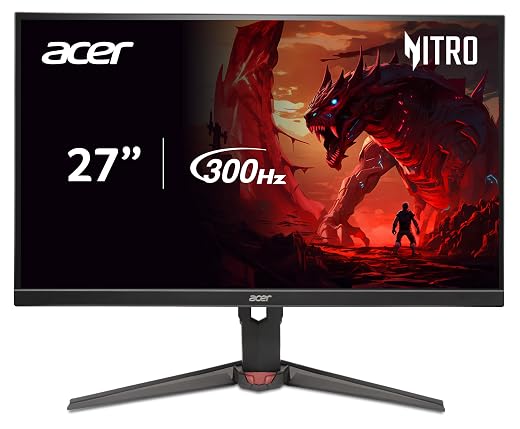
Competitive players looking for extreme speed without sacrificing visual density will appreciate the engineering inside the Acer Nitro 27in QHD 2560×1440 IPS. Built around a 27-inch In-Plane Switching display with a 2560 x 1440 WQHD resolution in a standard 16:9 aspect ratio, this display provides crisp geometric precision that makes targeting distant opponents far easier than on traditional 1080p screens. Known in technical catalogs as the acer nitro xv272u f3, this model pairs high pixel density with a native 300Hz refresh rate. That combination creates an ultra-smooth 2D motion scene where frames render rapidly, shortening frame delivery times and dropping input lag significantly during intense tactical gameplay. For players seeking an authentic acer 1440p 300hz monitor, it stands as an exceptional showcase of Acer’s high-speed IPS engineering.
Motion clarity remains paramount during fast-paced firefights, and this monitor addresses ghosting by achieving up to a 0.5ms Gray-to-Gray response time. Dramatic visual transitions and quick mouse swipes remain crisp without the smearing that plagues slower panels. Visual fidelity is further enhanced by VESA DisplayHDR 400 certification and support for an impressive 99 percent of the sRGB color gamut, making it versatile enough for color-critical workflows like graphic design and video editing alongside gaming. The display utilizes a matte finish to combat reflections, a 100 Million:1 MAX dynamic contrast ratio via Acer Contrast Management, and a peak brightness of 250 nits. Notably, the product listing specifies a 90-degree viewing angle rather than the wider angles typical of IPS panels, so centered positioning is essential for ideal contrast. Gamers exploring an acer 1440p monitor setup will value the ZeroFrame bezel design, which allows multi-display arrangements on a single desk.
Synchronization is managed by AMD FreeSync Premium technology, which locks the screen refresh cycle to the graphics card frame output to eliminate tearing and stuttering entirely. Ergonomic features include Acer ComfyView, flicker-less backlighting, and low dimming capabilities to alleviate eye strain over marathon play sessions. However, while this model leads the pack in combining 1440p sharpness with 300Hz velocity, the listing does not specify integrated speakers or multi-directional stand adjustments. Players who require an ultra-flexible mounting arm out of the box or who prioritize pure high-contrast 1080p frame throughput might instead favor the Acer Predator or the 280Hz Nitro alternatives examined below.
Pick 02
Acer Predator Gaming Monitor for Pure Esports Motion
Best for: Pro 1080p twitch shooters
- Buyer rating
- 4.1 average left by Amazon buyers
- Brand
- Acer
Pros
- Blistering 300Hz refresh rate
- Fully adjustable ErgoStand
- Built-in stereo speakers
Cons
- Lower 1080p resolution
- Glossy screen finish
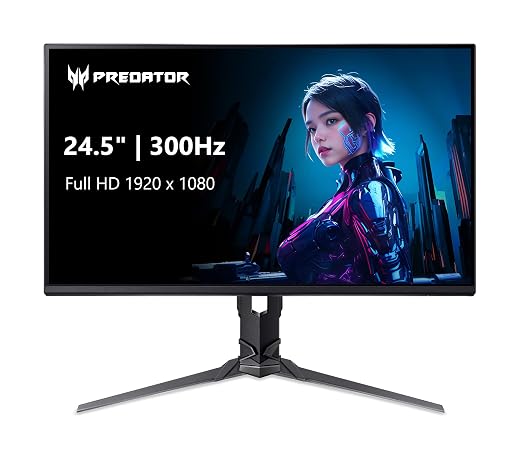
Engineered specifically for hyper-competitive tournament settings, the Acer Predator Gaming Monitor zeroes in on raw reaction speed and physical versatility. Carrying the model designation XB253Q Fbmiiprx, this 24.5-inch widescreen IPS display delivers Full HD 1920 x 1080 resolution, which remains the competitive benchmark for tactical first-person shooters. By pairing 1080p resolution with a blistering refresh rate of up to 300Hz, the acer predator xb253q ensures that modern graphics cards can sustain maximum frame output without hitting rendering bottlenecks. Operating as an elite acer 1080p 300hz monitor, it refreshes frame data at 3.33-millisecond intervals, providing near-instantaneous visual feedback and minimal input lag when tracking rapid target movements across your crosshairs.
Motion performance is backed by a 1ms Visual Response Boost rating, which actively suppresses ghosting and smearing during sudden lateral motions. Unlike many matte competitive panels, this model is built with a glossy screen finish that accentuates color vividness across its 99 percent sRGB gamut coverage. It also includes HDR10 support, enhancing image contrast and depth across dark scenes and highlights with a rated brightness of 250 nits. For physical deployment, Acer equipped this display with the signature ErgoStand, granting comprehensive adjustments including height customization, tilt, swivel, and full portrait pivot. Competitive players who rely on an acer predator monitor for intense practice sessions also benefit from Acer VisionCare technology, designed to safeguard eye health through reduced flicker and reduced blue light emissions.
Connectivity is comprehensive on this display, offering one DisplayPort 1.4 connection, two HDMI 2.0 ports, and two built-in stereo speakers rated at two watts each for convenient audio monitoring without headphones. Screen tearing is kept at bay through integrated AMD FreeSync Premium technology, aligning panel cycles to your GPU. While it excels as a contender for the best acer esports monitor in pure 1080p twitch scenarios, the 24.5-inch 1080p canvas does not offer the visual workspace or fine geometric crispness found on 27-inch 1440p displays. Shoppers who need greater desktop real estate for productivity alongside gaming may prefer the larger QHD models in this lineup.
Pick 03
Acer Nitro 24.5in FHD 1920×1080 280Hz for Compact Speed
- Highest rated 4.6★ average from Amazon buyers — the highest of the 4 rated in this guide

Best for: Fast-paced esports on compact desks
- Buyer rating
- 4.6 average left by Amazon buyers
- Brand
- Acer
Pros
- Fluid 280Hz refresh rate
- High 3000:1 contrast ratio
- ZeroFrame ultra-slim bezels
Cons
- Ergonomic stand adjustments not listed
- Integrated speakers not listed
When competitive performance must fit within space-conscious desk configurations, the Acer Nitro 24.5in FHD 1920×1080 280Hz delivers exceptionally fast frame pacing. Known in product specifications as the acer nitro kg251q, this monitor features a 24.5-inch Full HD 1920 x 1080 LCD panel tailored for rapid-response gaming. With an agile 280Hz refresh rate, this display shortens the time between frame redraws to keep high-velocity action smooth and readable. Whether tracking strafing targets in tactical arena shooters or following fast racing trajectories, the high frame ceiling provides a substantial competitive edge over standard 144Hz or 240Hz screens by significantly diminishing micro-stutter and input delay.
Visual rendering on the KG251Q is bolstered by a fast 1ms response time, preventing unsightly motion smearing during rapid camera pans. Uniquely within this comparison group, the listing notes a contrast ratio exceeding 3000:1 alongside wide 178-degree viewing angles, allowing for deeper shadow rendering and stable visual fidelity even when viewing off-axis. The panel features a matte screen finish to eliminate distracting light glare, while 250 candela per square meter of brightness and HDR10 support aid in visual contrast recreation. Comfort during prolonged sessions is preserved through Acer ComfyView anti-glare technology, low-dimming circuitry, and flicker-less backlighting that prevents visual fatigue.
Like its sibling displays, this model integrates AMD FreeSync Premium to guarantee tear-free synchronization with compatible graphics processors. Its ZeroFrame design removes thick external bezels, making it an efficient choice for dual-monitor configurations where seamless horizontal boundaries are required. However, the listing does not specify integrated audio speakers or extensive ergonomic adjustments beyond basic stand support. Gamers who require full height adjustment, built-in sound, or the absolute pinnacle of 300Hz refresh rate will find those features better fulfilled by the Predator XB253Q.
Pick 04
MONITOR Acer Nitro 27in QHD 2560×1440 for Balanced Ergonomics

Best for: Balanced 1440p competitive and casual gaming
- Buyer rating
- 4.4 average left by Amazon buyers
- Brand
- Acer
Pros
- Detailed 1440p IPS display
- Versatile 360-degree swivel ErgoStand
- Fast 240Hz refresh rate
Cons
- HDMI limited to 144Hz
- Slightly lower 240Hz ceiling
For enthusiasts who want an expansive visual canvas with tournament-level fluidity, the MONITOR Acer Nitro 27in QHD 2560×1440 offers a remarkably versatile balance of speed, resolution, and physical adaptability. Known in hardware circles as the acer nitro xv272u w2, this display incorporates a 27-inch IPS panel boasting a 2560 x 1440 WQHD native resolution. With a fine pixel pitch of 0.233mm, it renders games with intricate environmental detail, crisp typography, and broad peripheral vision. When connected via DisplayPort 1.4, the monitor operates at a rapid 240Hz refresh rate, while the dual HDMI 2.0 inputs accommodate console or secondary PC connections at up to 144Hz.
Pixel transitions are exceptionally swift, featuring a native 1ms Gray-to-Gray response time that can reach up to 0.5ms Gray-to-Gray under overdrive settings, successfully curbing ghosting artifacts during fast camera turns. AMD FreeSync Premium manages variable refresh duties to maintain tear-free visual output across fluctuating frame rates. Physical flexibility is one of the standout characteristics of this unit thanks to its fully articulating ErgoStand. The stand provides 4.7 inches of smooth height adjustment, a tilt range from -5 to 15 degrees, a generous 360-degree swivel, and a full 90-degree pivot into vertical portrait mode. Those comparing an acer nitro monitor 27 inch display against smaller options will find this mechanical adjustability critical for maintaining ergonomic comfort during long sessions.
Hardware connectivity is thoughtfully appointed, including one DisplayPort 1.4 port, two HDMI 2.0 ports, an audio-out jack, and two integrated two-watt speakers. Acer even supplies both DisplayPort and HDMI cables inside the box, simplifying immediate setup. The matte anti-glare coating ensures clear visibility under varying lighting conditions, and standard 100 x 100mm VESA compatibility allows for easy aftermarket arm mounting. While its 240Hz refresh rate is marginally lower than the 300Hz ceiling found on the XV272U F3, the inclusion of the fully versatile ErgoStand and integrated speakers makes the XV272U W2 a compelling, well-rounded hybrid choice for players who blend competitive gaming with everyday multimedia productivity.
How to Choose the Right Acer Gaming Monitor
Choosing an ultra-high refresh display requires balancing raw frame capability with rendering resolution. While an acer 300hz monitor highlights the absolute pinnacle of fluid motion, determining which acer monitor to buy ultimately depends on your graphics processing hardware, the genres you play, and your physical desk layout. In an acer gaming monitor comparison, resolution represents the initial major fork in the decision path. Displays operating at 1920 x 1080 resolution, such as the Acer Predator XB253Q and the Nitro KG251Q, reduce computational demand on your graphics card, making it substantially easier to sustain stable 280Hz to 300Hz frame rates in demanding competitive shooters like Counter-Strike 2, Valorant, or Apex Legends.
Conversely, upgrading to 2560 x 1440 WQHD resolution on a 27-inch panel—as seen on the Acer Nitro XV272U F3 and the XV272U W2—delivers a sharper pixel pitch and significantly more screen real estate. This extra clarity helps in spotting distant enemy models across open battlegrounds while providing superior fidelity for open-world single-player titles. However, driving a 1440p panel at 240Hz or 300Hz requires a robust graphics card capable of pushing substantial graphical bandwidth. If your setup possesses the GPU horsepower to drive high frame counts at 1440p, the XV272U F3 gives you the rare advantage of combining 300Hz speed with 1440p visual crispness.
Ergonomics and desk placement form another pivotal evaluation point. Gamers who spend extended hours training need proper monitor alignment to prevent neck strain and visual fatigue. The Acer Predator XB253Q and the Nitro XV272U W2 feature advanced ErgoStands capable of full height adjustment, tilt, swivel, and 90-degree pivot. By contrast, if your gaming station already incorporates an aftermarket VESA mounting arm, the baseline stand limitations of models like the Nitro KG251Q become less critical, letting you prioritize panel refresh rate and contrast performance over built-in mechanical adjustment.
Finally, examine connectivity and integrated features. If you intend to connect both a gaming PC and a modern home console to the same display, note the port specifications and refresh boundaries. For instance, the Nitro XV272U W2 achieves its maximum 240Hz refresh rate over DisplayPort 1.4 while capping HDMI 2.0 inputs at 144Hz. Additionally, built-in two-watt stereo speakers on the Predator XB253Q and Nitro XV272U W2 provide immediate utility for casual listening without putting on a headset, whereas displays without specified speakers necessitate dedicated audio peripherals.
FAQ
Can HDMI achieve the full 300Hz refresh rate on an Acer 300Hz monitor?
Most ultra-high refresh monitors require a DisplayPort connection to achieve their maximum rated frequency. On monitors featuring HDMI 2.0 ports, bandwidth limitations typically restrict refresh rates to 144Hz or 240Hz depending on the resolution. For instance, the Acer Nitro XV272U W2 specifies 240Hz over DisplayPort 1.4 but caps HDMI input at 144Hz. To ensure you unlock the full 300Hz capability on models like the Nitro XV272U F3 or the Predator XB253Q, connect your gaming PC via DisplayPort 1.4 using a high-quality certified cable.
What is the difference between Acer Nitro and Acer Predator monitors?
Acer positions the Nitro lineup to focus on high-performance gaming fundamentals, offering fast refresh rates, low response times, and aggressive ZeroFrame styling. The Predator lineup represents Acer’s specialized enthusiast tier, frequently incorporating premium hardware additions such as multi-directional ErgoStands, Acer VisionCare technologies, integrated stereo audio, and high-tier aesthetic elements designed specifically for esports tournament environments.
Is a 1440p 300Hz monitor better for esports than a 1080p panel?
A 1440p 300Hz display provides superior visual sharpness, higher pixel density, and cleaner distant target identification compared to a 1080p screen of similar or smaller size. However, sustaining 300 frames per second at 2560 x 1440 demands significantly more graphics processing power. For pure competitive twitch gameplay where high sustained framerates take absolute precedence over resolution, a 24.5-inch 1080p panel remains a popular standard because it minimizes peripheral eye tracking and optimizes GPU output.
How does AMD FreeSync Premium improve gaming on these Acer displays?
AMD FreeSync Premium dynamically synchronizes the monitor’s refresh rate to the instantaneous frame rate output of your graphics card. This synchronization eliminates horizontal screen tearing, minimizes display stutter, and lowers overall input latency. By preventing mismatched frame timing, FreeSync Premium ensures that fast-moving 2D action remains smooth even when in-game framerates fluctuate during graphically demanding combat sequences.
Do these Acer gaming monitors include integrated speakers?
Audio configurations vary across Acer’s gaming portfolio based on the model listing specifications. Both the Acer Predator XB253Q and the Acer Nitro XV272U W2 feature dual integrated speakers delivering two watts per channel, providing convenient audio without requiring a desktop soundbar or headset. Conversely, the listings for the Acer Nitro XV272U F3 and the Nitro KG251Q do not specify built-in speakers, meaning external audio gear or headphones should be used.
Where these figures come from
Every number on this page is read from the Amazon product listing: the price, the list price it is compared against, the specifications and the star rating. The star rating is the average left by Amazon buyers, not a score awarded by this site, and no product here has been handled or measured by us. The award ribbons are calculated across the products in this guide only, and each one states the figure it was based on.