HP ZBook Workstation Showdown: Performance and Graphics Compared
HP has established a formidable presence in the high-performance computing space through its ZBook line, delivering portable machines designed to withstand sustained computational and graphical punishment. Rather than functioning as standard office notebooks, an hp zbook workstation laptop is purpose-built to maintain thermal stability during long render sessions, complex CAD operations, large code compilations, and…
Prices and specifications come from the Amazon listing. Scores are out of 10, based on listed specifications and buyer feedback — this site does not test products.
Awards Worked out automatically from the Amazon listings of the 6 products in this guide.
-
Highest rated
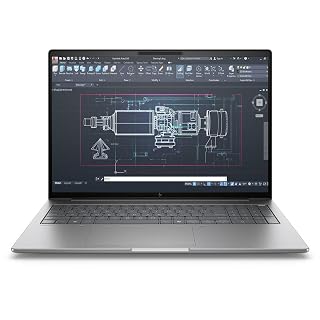
HP ZBook 8 G1i 16" Mobile for Modern AI-Assisted Multitasking
Our score: 10.0/10 — the highest of the 6 scored in this guide
As Amazon Associates, we earn from qualifying purchases. This means we may receive a small commission at no extra cost to you if you click through and make a purchase.
HP has established a formidable presence in the high-performance computing space through its ZBook line, delivering portable machines designed to withstand sustained computational and graphical punishment. Rather than functioning as standard office notebooks, an hp zbook workstation laptop is purpose-built to maintain thermal stability during long render sessions, complex CAD operations, large code compilations, and demanding digital media workflows. These machines bring workstation reliability, enterprise security integrations, and expansive I/O options directly to power users who cannot afford system throttles or crashes under load.
Across this lineup, the hardware configurations separate sharply between compact ultrabooks designed for mobile administrative tasks, multi-core computational giants tuned for calculation density, and dedicated GPU platforms built to deliver real-time 3D viewport acceleration and hybrid creative workloads.
HP Workstation Laptops Compared
| Model | Processor | Graphics | Display | Storage |
|---|---|---|---|---|
| HP ZBook Power Mobile Workstation Laptop | Intel Core i7-12800H (14 Cores) | NVIDIA RTX A1000 (4GB GDDR6) | 15.6″ FHD (1920×1080) | 1 TB SSD |
| HP ZBook 8 G1i 16″ Mobile | Intel Core Ultra 7 255H (16 Cores) | Intel Arc 140T (4GB) | 16″ WUXGA (1920×1200) | 1 TB SSD |
| HP ZBook X G1i Laptop | Intel Core Ultra 7 265H (16 Cores) | NVIDIA RTX PRO 1000 Blackwell (8GB GDDR7) | 16″ WUXGA (1920×1200) | 1 TB SSD |
| HP ZBook Fury 16 G11 | Intel Core i7-13850HX (20 Cores) | Integrated Intel UHD Graphics | 16″ WUXGA (1920×1200) | 1 TB SSD |
| HP ZBook Firefly 14 G8 | Intel Core i5-1135G7 (4 Cores) | Integrated Intel Graphics | 14″ FHD (1920×1080) | 512 GB SSD |
| HP ZBook 8 G1i Laptop | Intel Core Ultra 7 255H (16 Cores) | NVIDIA RTX 500 Ada (4GB GDDR6) | 16″ WUXGA (1920×1200) | 1 TB SSD |
Pick 01
HP ZBook Power Mobile Workstation Laptop for Solid CAD Performance

Best for: CAD designers and entry 3D modelers
- Our score
- 8.2 out of 10
- Brand
- HP
Pros
- Dedicated NVIDIA RTX A1000 graphics
- MIL-STD 810H aluminum chassis
- 14-core Intel Core i7 processor
Cons
- Traditional 16:9 aspect ratio
- Uses DDR4 memory platform
The HP ZBook Power Mobile Workstation Laptop is configured for engineers and designers who require a tested balance of multi-threaded computing and dedicated professional 3D acceleration. Built inside a rugged all-aluminum chassis tested to MIL-STD 810H durability benchmarks, this 15.6-inch model houses an Intel Core i7-12800H processor featuring 14 cores and 20 threads capable of hitting clock speeds up to 4.8GHz. Backing the processor is 32GB of system memory and a fast 1TB solid-state drive, ensuring rapid access to project files, seamless local data management, and stable operation under heavy multitasking.
Visual output is handled by a dedicated NVIDIA RTX A1000 graphics card with 4GB of GDDR6 memory, paired with a 15.6-inch Full HD 1920×1080 anti-glare IPS display. The GPU provides dedicated rendering pipelines for technical design applications, BIM modeling, and multi-layer video workflows. Exterior expandability is extensive, featuring Thunderbolt 4, three USB-A ports, dedicated RJ-45 Ethernet, and HDMI. For multi-display arrangements in an office, pairing the system with a high-bandwidth hub like an hp docking station for laptop dual monitor and charging makes it simple to run two external 4K displays at 60Hz without taxing the chassis ports.
This renewed hp zbook power mobile workstation serves architectural drafters, technical designers, and mechanical engineering students who require dedicated hardware validation without ballooning into excessive weight. Where it yields to newer hardware is in its traditional 16:9 aspect ratio and 12th-generation Intel silicon, meaning users prioritizing next-generation neural engines or larger vertical display formats may prefer looking at the newer G1i generations.
Pick 02
HP ZBook 8 G1i 16" Mobile for Modern AI-Assisted Multitasking
- Highest rated Our score: 10.0/10 — the highest of the 6 scored in this guide
Pros
- Dedicated NVIDIA RTX 500 Ada GPU
- Portable 3.8-pound design
- Wi-Fi 7 and 5MP IR webcam
Cons
- Limited to 4GB video memory
- Listing notes resealed upgraded unit
Best for: Business analysts and AI multitasking
Pros
- 16-core Intel Core Ultra 7
- 16:10 WUXGA anti-glare display
- Integrated Intel Arc graphics
Cons
- No dedicated NVIDIA GPU
- Standard 60 Hz display refresh
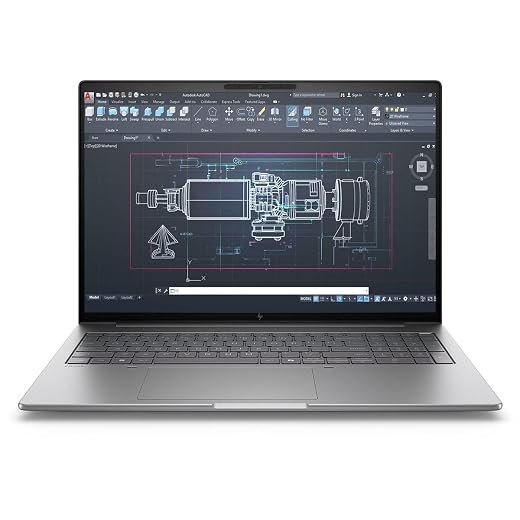
Representing a modern pivot in workstation design, the HP ZBook 8 G1i 16″ Mobile transitions to Intel’s Core Ultra architecture. Running an Intel Core Ultra 7 255H processor with 16 physical cores, this laptop integrates dedicated neural processing silicon directly on the die to accelerate modern background AI tasks, audio rendering, and power management routines. It includes 32GB of RAM and a 1TB SSD, delivering ample responsiveness when running parallel spreadsheets, analytical databases, and intensive workspace utilities.
The visual canvas steps up to a modern 16-inch WUXGA display sporting a 1920×1200 resolution and an anti-glare finish. The 16:10 aspect ratio provides crucial vertical screen space, giving programming environments, video timelines, and large data tables extra breathing room. Rather than utilizing a discrete workstation graphics board from NVIDIA, this configuration relies on an integrated Intel Arc 140T GPU with 4GB allocation, keeping thermal output modest while offering reliable hardware media encoding and multi-monitor output.
Finished in a clean Meteor Silver finish, this hp zbook 8 g1i mobile targets business analysts, developers, and project managers who want a spacious 16-inch workspace and modern power efficiency. However, because it relies on Intel Arc graphics, users whose primary workload centers on heavy CUDA-accelerated ray tracing or intense GPU rendering will find better performance in models sporting dedicated Ada or Blackwell hardware.
Pick 03
HP ZBook X G1i Laptop for Advanced 3D Rendering and AI

Best for: Demanding 3D rendering and creative developers
- Our score
- 9.2 out of 10
- Brand
- IST Computers
Pros
- NVIDIA RTX PRO 1000 Blackwell 8GB
- Fast Intel Core Ultra 7 265H
- Next-gen Wi-Fi 7 connectivity
Cons
- Heavier 4.5-pound chassis
- Listing does not state RAM
The HP ZBook X G1i Laptop represents a serious leap in graphical capability, positioning itself as a premier desktop replacement for computational developers and visual specialists. At its core is the Intel Core Ultra 7 265H processor, delivering 16 cores, 16 threads, 24MB of L3 cache, and burst frequencies reaching up to 5.3GHz. HP pairs this processor with an advanced thermal cooling design and an 83Wh battery, allowing creators to push prolonged simulation and rendering tasks without immediate thermal throttling.
Graphical muscle is this configuration’s standout asset. It carries the dedicated NVIDIA RTX PRO 1000 Blackwell GPU equipped with 8GB of high-speed GDDR7 memory. This GPU configuration delivers exceptional headroom for 3D simulation, spatial computing, deep learning workflows, and high-fidelity real-time rendering. The display is a 16-inch 1920×1200 WUXGA anti-glare IPS panel operating at 300 nits of brightness. For multi-monitor work environments, the system can drive up to three external 4K displays at 60Hz simultaneously via dual Thunderbolt 4 and HDMI 2.1 interfaces.
Weighing 4.5 pounds and pre-installed with Windows 11 Pro, this hp zbook x g1i laptop easily stands out as a candidate for the best hp zbook for gaming and editing. It provides the high video memory ceiling and fast memory bandwidth needed for complex visual effects, high-frame-rate rendering, and modern gaming. It only gives ground if absolute maximum CPU core count is your single priority over dedicated GPU rendering prowess.
Pick 04
HP ZBook Fury 16 G11 for Multi-Threaded Heavy Processing

Best for: Software compilation and dense computational workflows
- Our score
- 8.0 out of 10
- Brand
- HP
Pros
- 20-core Intel Core i7-13850HX
- High-speed 32GB DDR5 memory
- Dual Thunderbolt 4 with Mini DisplayPort
Cons
- Integrated Intel graphics only
- Thicker 1.13-inch profile
When computational brute force is the primary requirement, the HP ZBook Fury 16 G11 brings enterprise desktop-class processor architecture into a clamshell workstation format. This machine is driven by a 55-watt class Intel Core i7-13850HX processor, packing an immense layout of 20 cores (8 performance cores and 12 efficient cores), 28 threads, and 30MB of Intel Smart Cache, reaching boost speeds of up to 5.3GHz. Paired with 32GB of DDR5 memory and a 1TB PCIe NVMe SSD, this platform is tailored to compile massive software repositories, execute heavy statistical simulations, and process dense datasets.
The chassis measures 1.13 inches thick, prioritizing internal thermal volume and comprehensive physical connectivity. Interface options include dual Thunderbolt 4 ports, USB-A, HDMI 2.1, RJ-45 Ethernet, a full-size SD 7.1 media card reader, and a dedicated Mini DisplayPort 1.4 connection. The screen is a 16-inch WUXGA 1920×1200 anti-glare panel in a 16:10 format. Power users operating from complex multi-screen battlestations can expand their external peripherals and high-speed storage arrays through an anker thunderbolt 5 dock or equivalent professional docking solutions.
Graphics on this specific model are driven by Integrated Intel UHD Graphics, indicating a deliberate design focus on raw CPU computing power, multi-display office productivity, and virtualization rather than dedicated 3D visualization. Software engineers, database administrators, and financial analysts will find the 20-core computational capacity unparalleled, though users needing raw 3D polygon manipulation should look toward models with dedicated RTX silicon.
Pick 05
HP ZBook Firefly 14 G8 for Lightweight Field Mobility

Best for: Mobile professionals and travel computing
- Our score
- 9.4 out of 10
- Brand
- HP
Pros
- Lightweight 3-pound chassis
- Spill-resistant keyboard with TrackPoint
- Integrated BitLocker enterprise security
Cons
- Modest 512GB SSD capacity
- Older 11th Gen quad-core CPU
The HP ZBook Firefly 14 G8 focuses entirely on compact field mobility without abandoning the durable build standards of the ZBook series. Measuring just 0.70 inches thin and weighing an agile 3 pounds, this renewed ultraportable slips easily into any bag. It is powered by an Intel Core i5-1135G7 quad-core processor reaching speeds up to 4.2GHz, supported by 16GB of DDR4 memory and a 512GB solid-state drive.
Its 14-inch Full HD 1920×1080 IPS anti-glare screen is tailored for bright office spaces, client meetings, and travel environments, keeping eye strain to a minimum. Despite its thin frame, the chassis provides solid connectivity, including two USB Type-C ports, two USB Type-A connections, a full-sized HDMI port, and a headphone/microphone jack. For navigation, it includes both a precision touchpad and a traditional TrackPoint integrated directly into the spill-resistant keyboard deck.
Running Windows 11 Pro with built-in BitLocker encryption and TPM 2.0 security, this hp zbook firefly 14 g8 suits mobile professionals, field auditors, educators, and enterprise administrators who prioritize light travel and battery efficiency over heavy-duty rendering. Its quad-core 11th Gen architecture and integrated graphics make it an agile mobile workstation, though it intentionally steps back when compared to the 16-core and 20-core powerhouses in the larger 16-inch lineup.
Pick 06
HP ZBook 8 G1i Laptop for Portable 3D CAD and Visual Design

- Our score
- 8.0 out of 10
- Brand
- IST Computers
Balancing modern processor efficiency with dedicated graphics hardware, the HP ZBook 8 G1i Laptop delivers workstation-grade 3D performance in a sleek 3.8-pound form factor. Under the hood sits the Intel Core Ultra 7 255H processor with 16 cores, 16 threads, 24MB of L3 cache, and speeds up to 5.1GHz. This platform combines energy-efficient processing with modern AI acceleration, backed by a fast 1TB SSD for storing active design files and rendering caches.
What elevates this machine for visual professionals is its dedicated NVIDIA RTX 500 Ada Generation laptop GPU equipped with 4GB of GDDR6 dedicated memory. This GPU enables smooth viewport orbiting, hardware ray tracing, and stable driver execution in professional modeling and creative suites. The 16-inch WUXGA 1920×1200 IPS display outputs 300 nits of brightness through an anti-glare coating, while external video pipelines support up to 8K resolutions at 60Hz over Thunderbolt 4, alongside dual-display 4K output via HDMI 2.1 and USB-C.
Connectivity is cutting-edge, featuring Intel Wi-Fi 7, Bluetooth 5.4, dual Thunderbolt 4, USB-C 3.2 Gen 2×2, gigabit Ethernet, and a 5MP IR webcam with a physical privacy shutter. For creators who regularly bounce between remote job sites and studio desks, this laptop offers a compelling blend of dedicated GPU muscle and sub-4-pound mobility, outperforming integrated-graphics machines in design tasks while staying noticeably lighter than bulky desktop replacements.
How to Choose the Right HP Workstation Laptop
Selecting the ideal machine from an hp workstation laptop comparison requires understanding how different hardware components match up against your software demands. HP divides the ZBook family into distinct tiers, and choosing correctly depends on whether your daily work stresses the processor, the graphics pipeline, or mobile portability.
- Processor Core Architecture: If your workflow involves compiling large codebases, crunching massive financial models, or running local virtual machines, CPU core count is paramount. The 20-core Intel Core i7-13850HX in the HP ZBook Fury 16 G11 provides massive computational throughput. For balanced processing and modern AI capabilities, the Intel Core Ultra 7 chips found in the G1i variants offer 16 modern cores with improved power efficiency.
- Dedicated GPU vs. Integrated Graphics: Dedicated graphics are essential for 3D modeling, spatial rendering, and hybrid gaming. The HP ZBook X G1i leads this category with its 8GB NVIDIA RTX PRO 1000 Blackwell GPU, while the HP ZBook 8 G1i Laptop provides capable 3D acceleration with its 4GB RTX 500 Ada. Conversely, if your work is purely code, analytical, or administrative, the integrated graphics in the Fury 16 G11 or Firefly 14 G8 provide quiet, efficient operation.
- Chassis Footprint and Mobility: Creators and technicians working in the field need to weigh screen size against travel weight. The HP ZBook Firefly 14 G8 is exceptionally portable at just 3 pounds and a 14-inch footprint. If you need a larger 16-inch 16:10 workspace, the 3.8-pound HP ZBook 8 G1i offers modern screen real estate without the heavy bulk of traditional 1.13-inch workstation frames.
- Docking and Port Expandability: Workstation users often connect high-resolution external monitors, audio interfaces, and high-speed network storage. Models equipped with dual Thunderbolt 4 ports allow seamless integration into desktop workstations via a dedicated hp hub docking station, enabling single-cable connections for power, multi-display output, and external storage access.
Evaluating which hp zbook to buy ultimately comes down to identifying your system bottleneck. Prioritize GPU memory for 3D environments, maximum multi-core frequency for analytical computing, and compact chassis designs for uninterrupted mobile productivity.
FAQ
What makes an HP ZBook workstation different from a standard business laptop?
An HP ZBook workstation laptop is designed to handle sustained computational and graphical loads that would cause standard consumer or business notebooks to throttle. ZBooks incorporate advanced cooling solutions, military-grade chassis durability tested to MIL-STD standards, ISV software certifications, and options for dedicated professional GPUs from NVIDIA to ensure data integrity during prolonged rendering or simulation tasks.
Can an HP ZBook workstation laptop be used for gaming and media entertainment?
Yes, especially models configured with dedicated graphics hardware. Machines like the HP ZBook X G1i featuring the NVIDIA RTX PRO 1000 Blackwell GPU and the HP ZBook 8 G1i with the RTX 500 Ada card handle modern game titles, 3D asset generation, and 4K video playback with ease. Their high-performance cooling systems ensure consistent frame rates and thermal stability during extended gaming sessions.
What is the advantage of a 16:10 WUXGA display on 16-inch ZBook models?
A 16-inch WUXGA display with a 1920×1200 resolution uses a 16:10 aspect ratio, which provides extra vertical screen real estate compared to traditional 16:9 Full HD panels. This added vertical space allows programmers, audio engineers, video editors, and financial analysts to view more lines of code, timeline tracks, and spreadsheet rows without constant vertical scrolling.
Is 32GB of RAM necessary for an HP ZBook mobile workstation?
For demanding creative and engineering tasks, 32GB of system memory is widely considered the sweet spot. It provides enough headroom to run memory-intensive CAD software, large Adobe creative project files, and virtual machines concurrently without causing the operating system to swap data to the SSD, maintaining smooth real-time performance.
Do HP ZBook laptops support multi-monitor desktop setups without extra adapters?
Yes, HP ZBooks feature workstation-class display connectivity built directly into the chassis. Depending on the model, configurations offer dedicated HDMI 2.1 ports, Mini DisplayPort, and high-bandwidth Thunderbolt 4 ports capable of driving multiple external 4K monitors natively without requiring specialized external video splitters.
Where these figures come from
The price, the list price it is compared against and the specifications on this page are read from the Amazon product listing. Scores are out of 10, based on listed specifications and buyer feedback, and no product here has been handled or measured by us. The award ribbons are calculated across the products in this guide only, and each one states the figure it was based on.