Top Razer USB Hubs and Docks Ranked for Battlestation Performance
Razer has earned a prominent reputation across PC gaming hardware by designing high-bandwidth peripherals, distinctive aluminum chassis, and deeply integrated battlestation hardware. In the connectivity category, the brand engineers docking stations and multi-port hubs specifically to solve the physical limitations of modern gaming laptops and minimalist desktop setups. Rather than treating port expansion as an…
Prices and specifications come from the Amazon listing. Ratings are the average left by Amazon buyers — this site does not test products.
Awards Worked out automatically from the Amazon listings of the 4 products in this guide — no editorial scoring.
-
Highest rated
Razer USB-C Dock for Mobile Gaming Rigs
4.8★ average from Amazon buyers — the highest of the 4 rated in this guide
As Amazon Associates, we earn from qualifying purchases. This means we may receive a small commission at no extra cost to you if you click through and make a purchase.
Razer has earned a prominent reputation across PC gaming hardware by designing high-bandwidth peripherals, distinctive aluminum chassis, and deeply integrated battlestation hardware. In the connectivity category, the brand engineers docking stations and multi-port hubs specifically to solve the physical limitations of modern gaming laptops and minimalist desktop setups. Rather than treating port expansion as an afterthought, Razer designs hardware to route high-refresh gaming displays, low-latency mechanical keyboards, esports mice, audio systems, and high-wattage power delivery through unified host connections. For players managing dense desktop wiring or connecting a portable laptop to an external battlestation, deploying a dedicated razer gaming usb hub ensures display signals and critical input devices operate reliably without bandwidth bottlenecks.
Across this hardware lineup, connectivity solutions range from portable travel docks and integrated monitor risers to cutting-edge desktop hubs, differing primarily in host connection bandwidth, total port count, multi-monitor refresh capabilities, and physical desk organization.
Razer USB Hubs Compared
| Model | Total Ports | Host Interface | Video Output Capabilities | Power Delivery & Charging |
|---|---|---|---|---|
| Razer USB-C Dock | 11 | USB Type C | 4K at 60 Hz or Full HD at 240 Hz (1x HDMI) | 85 W laptop delivery (100 W PD input; adapter not included) |
| Razer USB 4 Dock | 14 | USB 4 (USB 2.0 hardware interface listed) | Dual monitor support; up to 4K at 120 Hz primary | 100 W laptop delivery (180 W adapter included) |
| Razer Monitor Stand Chroma | 4 | USB Type C | 1x HDMI 2.0 | Not listed |
| Razer Thunderbolt 4 Dock | 10 | Thunderbolt 4 (40 Gbps) | Dual 4K at 120 Hz, single 5K at 60 Hz, or single 8K | Pass-through charging supported |
Pick 01
Razer USB-C Dock for Mobile Gaming Rigs
- Highest rated 4.8★ average from Amazon buyers — the highest of the 4 rated in this guide

Best for: Mobile gamers and travelling creators
- Buyer rating
- 4.8 average left by Amazon buyers
- Brand
- Razer
Pros
- 11 versatile connectivity ports
- Supports 240 Hz Full HD gaming
- Durable aluminum alloy body
- 85 W laptop power delivery
Cons
- Power adapter not included
- Single external display only
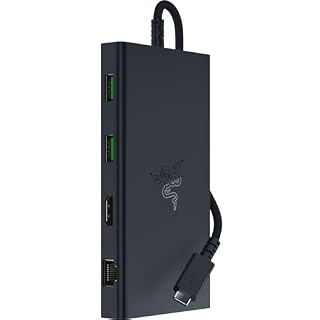
The Razer USB-C Dock is engineered as an 11-in-1 portable travel hub designed to provide comprehensive connectivity in both mobile and permanent gaming environments. Built inside a durable and lightweight all-metal casing crafted from aluminum alloy, the chassis provides structural protection while aiding precision thermal management during sustained gaming sessions. Razer equips this razer multiport adapter with a balanced selection of 11 ports: 4 USB-A ports, Gigabit Ethernet, a single HDMI port, a 3.5 mm audio combo jack, UHS-I SD and MicroSD card slots, and 2 USB-C ports. The listing also highlights NASA packaging and a solid black aesthetic that blends seamlessly into minimalist desks or travel bags.
Display and audio performance on this razer usb c dock are optimized for both creative workflows and high-speed competitive gaming. Through its dedicated HDMI port, the hub supports external displays running at 4K resolution at 60 Hz for crisp visual fidelity, or up to 240 Hz in Full HD for esports players who require ultra-smooth frame rates. Audio handling is driven through an integrated 3.5 mm combo jack featuring advanced 7.1 surround sound, delivering pinpoint positional cues for connected gaming headsets and desktop speakers. The dock provides 85 W of laptop power delivery and smartphone fast charging from a 100 W PD power profile, allowing users to power their host laptop, tablet, or mobile phone while simultaneously running connected peripherals. Note that the listing specifies the external USB charging cable and power adapter are not included with the dock. Those exploring alternative tablet-centric connectivity options can read our anker ipad hub overview to compare multi-platform tablet connectivity requirements. The hardware offers broad operating system support across Windows PC, Mac, iPad, and Chromebook devices, backed by a 2-year manufacturer warranty.
This dock is best suited for traveling esports players, hybrid professionals, and laptop gamers who prioritize lightweight portability and high-refresh 1080p display performance without carrying a massive external power brick. However, it yields to larger desktop models like the Razer USB 4 Dock when users require simultaneous dual-monitor output or dedicated out-of-the-box high-wattage power supplies.
Pick 02
Razer USB 4 Dock for Dual-Display Battlestations
Best for: Multi-monitor battlestations needing maximum ports
- Buyer rating
- 4.3 average left by Amazon buyers
- Brand
- Razer
Pros
- 14 expansion ports
- Dual display up to 4K 120Hz
- Included 180 W power adapter
- Dedicated power shutdown button
Cons
- Bulky desktop footprint
- Lacks integrated SD card slots
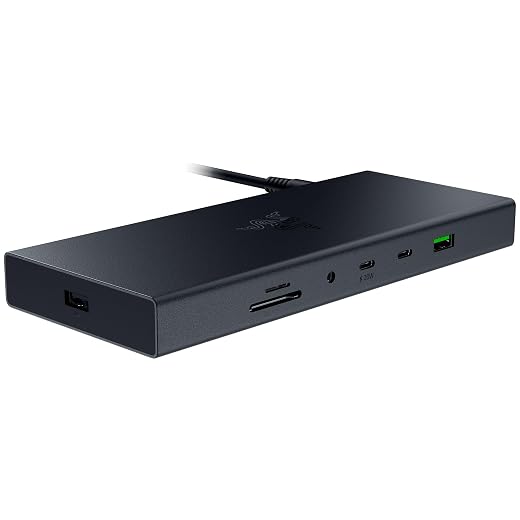
The Razer USB 4 Dock serves as a high-density, centralized connectivity hub built for performance desktops and high-powered gaming laptops. Encased in an all-metal aluminum enclosure designed for low heat buildup and everyday durability, the dock measures 9 inches long, 8 inches wide, and 4 inches high, weighing 1.67 kg. Its comprehensive 14-port design is engineered to minimize cable clutter by routing all monitors, external hard drives, audio devices, and input peripherals through a single USB-C host connection. While the specification listing records a USB 2.0 hardware interface with a 120 hertz data rate, the listing title and features confirm it operates on the modern USB 4 standard with backward compatibility for USB 2.0 and USB 3.0 gear.
Display output is a major strength of this unit, providing robust dual monitor support that allows players to run high-fidelity gaming on a primary display at up to 4K resolution at 120 Hz while retaining a secondary screen for chat windows, streaming software, or productivity applications. Power infrastructure is fully self-contained: the dock features always-on laptop charging that delivers 100 W of continuous power delivery to the connected computer using an included 180 W desktop power adapter. A physical, dedicated power button sits on the chassis, allowing users to power down the entire docking array for energy efficiency when the setup is idle. For players considering alternative video converter options across desktop gear, our anker usbc to hdmi breakdown provides useful context on display connectivity standards. The dock requires Windows 11 as its minimum operating system version while maintaining compatibility across both Windows and Mac workstations.
This model is the ideal choice for dedicated desk setups, streamers, and multi-display enthusiasts who require high-refresh 4K video bandwidth and an included heavy-duty power supply that powers the host system without purchasing separate adapters. It gives way to the Razer Thunderbolt 4 Dock for users who specifically need Thunderbolt daisy-chaining, UHS-II SD card reading, or dynamic Chroma lighting integration.
Pick 03
Razer Monitor Stand Chroma for Ergonomic Desk Organization
Best for: Desktops requiring ergonomic height and RGB integration
- Buyer rating
- 4.6 average left by Amazon buyers
- Brand
- Razer
Pros
- Ergonomic display elevation
- Customizable Razer Chroma RGB
- Programmable chassis control button
- Integrated desk organizer shelf
Cons
- Only four hub ports
- Single external display output
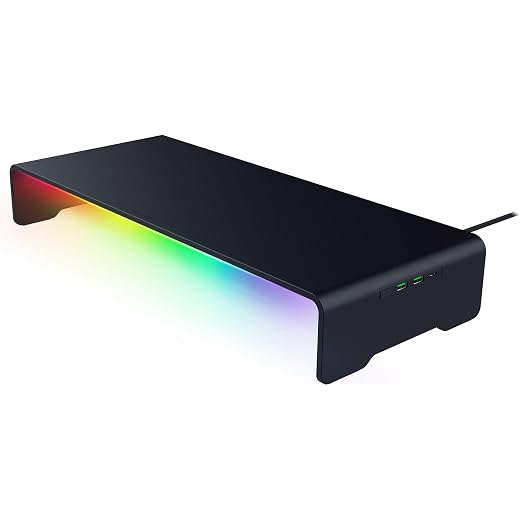
The Razer Monitor Stand Chroma rethinks peripheral routing by integrating a 4-port connectivity hub directly into an ergonomic battlestation monitor riser. Measuring 19.7 inches long and 8.27 inches wide, the riser is constructed from heavy-duty anodized aluminum treated with an electrochemically bonded matte black finish. Fitted with anti-slip rubber pads, the stand elevates an external display to eye level to promote comfortable neck posture during marathon gaming or editing sessions. Beneath the elevated surface, an integrated organizer shelf provides dedicated clearance to stow laptops, handheld gaming consoles, stationery, or mobile devices neatly out of the way.
Connectivity is centralized through a single USB-C host cable, with Razer supplying a USB Type-C to Type-C cable in the box. The built-in 4-port hub supplies two USB 3.2 Type-A ports, one USB 3.2 Type-C port, and an HDMI 2.0 video output for routing desktop accessories and display signals. Aesthetics and controls are centered around Razer Chroma RGB, which projects customizable lighting across 16.8 million colors and reactive effects that synchronize with other Chroma-enabled peripherals. On the exterior chassis, a remappable Chroma RGB button allows users to cycle through lighting presets by default, or be reprogrammed via software to launch games, mute audio, or trigger custom keybinds. Users seeking basic four-port routing solutions outside an integrated riser form factor can review our anker usb hub 4 ports resource for reference. The riser is backed by a 2-year manufacturer warranty.
This product suits desktop gamers who want to improve their posture, conceal desk clutter, and expand front-facing ports while adding customizable underglow lighting to their workspace. It gives way to the Razer USB-C Dock or Razer Thunderbolt 4 Dock when multi-monitor connectivity, Gigabit Ethernet, high-speed card readers, or portable form factors are required.
Pick 04
Razer Thunderbolt 4 Dock for High-Speed Creative Workstations

Best for: High-bandwidth Thunderbolt 4 workstation setups
- Buyer rating
- 4.2 average left by Amazon buyers
- Brand
- Razer
Pros
- 40 Gbps Thunderbolt 4 speeds
- Dual 4K 120Hz display support
- High-speed UHS-II SD reader
- Three downstream Thunderbolt ports
Cons
- Requires Thunderbolt host for full speed
- Fewer USB-A ports than docks
The Razer Thunderbolt 4 Dock, also identified in listing details as the Razer Thunderbolt 4 Dock Chroma, is a certified 40 Gbps docking solution tailored for elite creator and gaming setups. Housed in a classic black finish with integrated RGB underglow lighting, this razer chroma dock measures 7.48 inches long, 2.95 inches wide, and 1.06 inches high, weighing 12 ounces. It provides 10 versatile ports, consisting of 4 Thunderbolt 4 ports (1 upstream host port and 3 downstream ports), 3 USB-A 3.2 Gen 2 ports, Gigabit Ethernet, a 3.5 mm audio combo jack, and a high-speed UHS-II SD card slot supporting the SD 4.0 standard.
Bandwidth is the hallmark of this Thunderbolt 4 certified hub. It supports data transfer rates up to 40 Gbps, backward compatibility with legacy Thunderbolt gear, and compliance with USB4 protocols. For display routing, it enables dual monitor setups running up to dual 4K displays at 120 Hz on Intel Mac and Windows platforms, a single 5K display at 60 Hz on M1 Mac hardware, or up to a single 8K display output via a single Thunderbolt 4 cable. The dock supports pass-through laptop charging to keep the host battery topped off during intense rendering or gaming workloads, alongside peripheral wake functionality that wakes the connected laptop from sleep using connected mice or keyboards. It requires Windows 10 or later and supports both Windows and Mac operating systems.
This dock is the premier selection for demanding PC gamers, content creators, and multi-device workstation users who require maximum throughput for high-speed NVMe storage, downstream Thunderbolt accessories, and dual high-refresh 4K gaming screens. While it offers fewer total USB-A ports than the 14-port USB 4 Dock, its 40 Gbps transfer speeds, UHS-II media ingestion, and downstream Thunderbolt expansion place it at the apex of Razer’s connectivity lineup.
How to Choose the Right Razer USB Hub
Selecting the right model from this razer usb hub comparison requires matching your host computer interface to the bandwidth requirements of your gaming battlestation. If your primary goal is clean peripheral routing for a gaming laptop on the move, bus-standard docks provide adequate throughput for everyday gear. However, if your setup relies on high-speed external storage arrays or multi-monitor arrays, prioritizing USB4 or Thunderbolt 4 ensures your hardware is not choked by interface limitations.
Display configurations and monitor refresh rates represent another critical dividing line when deciding which razer usb hub to buy. The portable Razer USB-C Dock provides single-display output capable of 4K at 60 Hz or 1080p at 240 Hz, making it suitable for competitive esports panels. If your battlestation uses multiple high-resolution screens, both the Razer USB 4 Dock and the Razer Thunderbolt 4 Dock deliver dual-display output supporting up to 4K at 120 Hz. Meanwhile, the Razer Monitor Stand Chroma integrates an HDMI 2.0 port tailored for elevating and driving a single primary desktop monitor.
Power delivery infrastructure should also guide your purchase. The Razer USB-C Dock supports 85 W laptop charging via a 100 W PD profile, but requires you to supply your own charger and cable. In contrast, the Razer USB 4 Dock comes equipped with a dedicated 180 W power adapter that guarantees 100 W continuous charging to the host computer alongside all connected USB peripherals. The Razer Thunderbolt 4 Dock similarly integrates pass-through charging, ensuring your laptop remains fully charged through one cable.
Finally, consider how physical form factor and aesthetic integration affect your desk layout. Gamers seeking an ultra-clean aesthetic with built-in monitor elevation and synchronized RGB lighting will benefit most from the Razer Monitor Stand Chroma, which doubles as an organizer shelf. If maximizing front-and-rear port density is your absolute priority, standalone hubs like the Razer USB 4 Dock and Razer Thunderbolt 4 Dock deliver the necessary port volume while keeping desktop cabling organized behind your setup.
FAQ
Can the Razer USB-C Dock output high refresh rates for competitive gaming?
Yes. The Razer USB-C Dock supports full 1080p resolution at up to 240 Hz over its HDMI port, in addition to supporting 4K displays at 60 Hz. This high-refresh capability makes it well-suited for connecting portable gaming laptops to high-speed esports monitors.
Does the Razer USB 4 Dock include its own power supply?
Yes. The Razer USB 4 Dock comes packaged with a dedicated 180 W power adapter. This included power supply delivers up to 100 W of continuous charging to the host laptop while supplying sufficient power to all 14 expansion ports simultaneously.
What functions can be programmed to the button on the Razer Monitor Stand Chroma?
By default, the remappable button on the Razer Monitor Stand Chroma cycles through different Razer Chroma RGB lighting presets. However, users can customize the button to launch specific applications, quickly mute system audio, or execute custom key binds for gaming and productivity.
What is the difference between the Razer USB 4 Dock and the Razer Thunderbolt 4 Dock?
The primary differences lie in port architecture, speed, and aesthetics. The Razer USB 4 Dock provides 14 total ports, an included 180 W power brick, and a physical power button in a matte-black enclosure. The Razer Thunderbolt 4 Dock provides 10 ports with 40 Gbps bandwidth, three downstream Thunderbolt 4 ports, a UHS-II SD card slot, and customizable Razer Chroma RGB underglow lighting.
Are Razer USB docks compatible with both Windows and Mac systems?
Yes. The Razer USB-C Dock, Razer USB 4 Dock, and Razer Thunderbolt 4 Dock all list compatibility for both Windows and Mac operating systems. However, users should verify their specific host system hardware capabilities, as features like multi-monitor support and refresh rates can vary between Windows and Mac environments.
Where these figures come from
Every number on this page is read from the Amazon product listing: the price, the list price it is compared against, the specifications and the star rating. The star rating is the average left by Amazon buyers, not a score awarded by this site, and no product here has been handled or measured by us. The award ribbons are calculated across the products in this guide only, and each one states the figure it was based on.